Robotic Control & Embodied Intelligence
A six-axis desktop robotic arm combined with multimodal perception, enabling master-slave teleoperation, precise 3D spatial grasping, and embodied intelligence development.
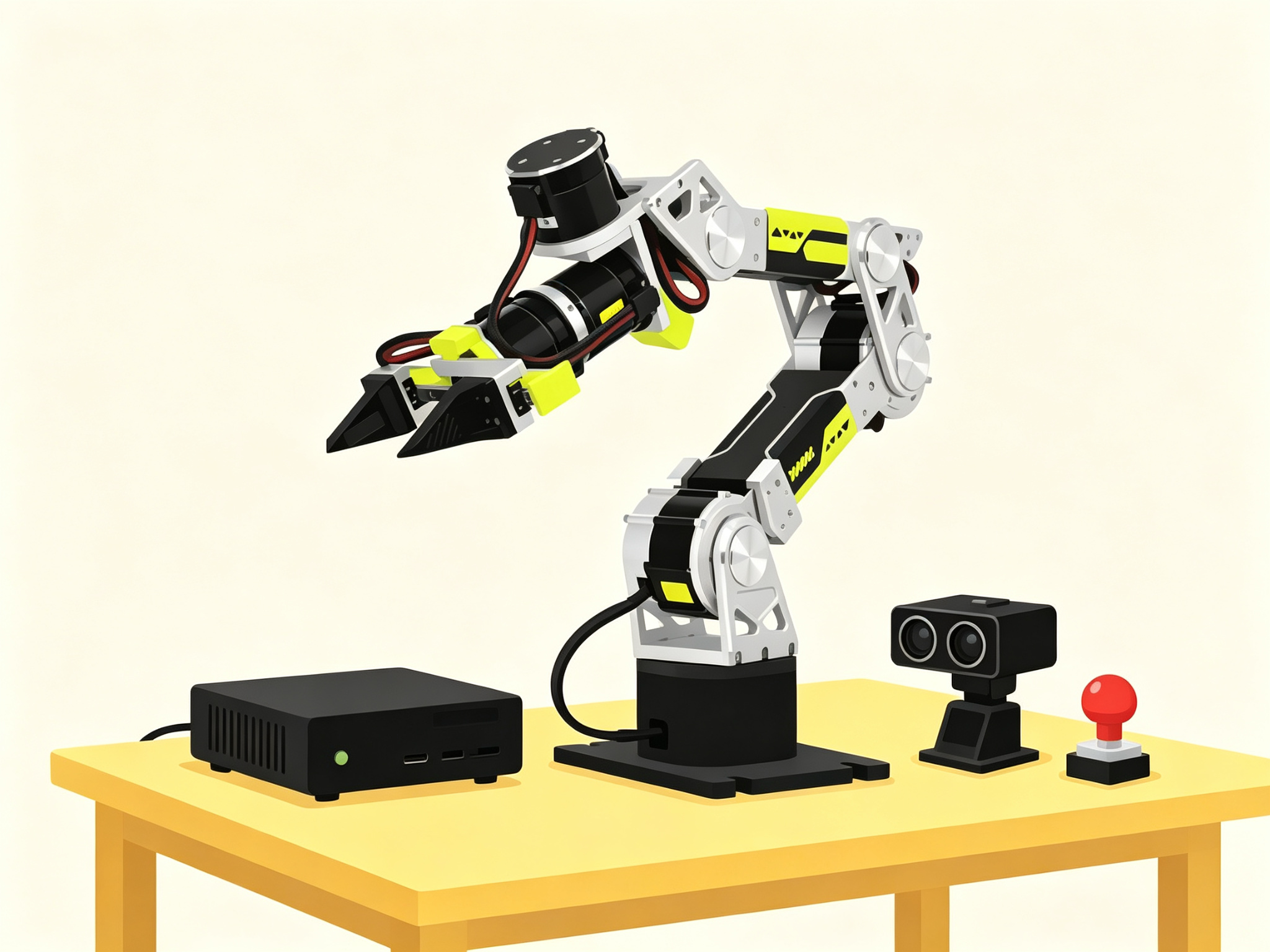
Core Hardware
- ARM reBot DevArm B601-RS Six-axis slave actuator arm · includes electric gripper and bus servos
- MASTER Star Arm 102 Master teach arm · 1:1 master-slave teleoperation · LeRobot-compatible
- EDGE reComputer Super J4012 Jetson Orin NX 16GB · control hub and inference host
- DEPTH Orbbec Gemini 2 RGB-D depth camera · 3D spatial coordinate positioning
- ESTOP Industrial-Grade Independent Emergency Stop Button Normally-closed hardware circuit · hard-cuts power · not connected to software
What This Module Solves
For scenarios such as agricultural product appearance sorting, lightweight automated production-line auxiliary loading/unloading, exhibition booth welcome demonstrations, and auxiliary workstations, traditional robotic-arm teaching starts with kinematics derivation and motor control, resulting in long ramp-up for application-side personnel. LLMs are mostly limited to text generation and lack a standard path to physical actuators; building a sorting/handling demo from scratch requires integrating vision recognition, motion planning, and grasping sequencing, making multi-system integration difficult. Novices operating powered robotic arms face physical safety risks such as collisions and unintended workspace entry.
- Difficulty
- Beginner
- Duration
- L1 1 day / L2 2–3 days / L3 3–5 days
- Shortest Format
- 1 day (Taster Session · L1)
- Teaching Format
- 3 tiers: Taster / Workshop / Bootcamp
- Core Actuator
- reBot DevArm B601-RS Six-Axis Robotic Arm
- Core Toolchain
- SenseCraft Robotics / Pinocchio / Motorbridge SDK / LeRobot
L1: none (zero baseline, basic computer operation skills). L2: basic network configuration and system linkage concepts. L3: basic Python programming and Linux skills.
Typical Scenarios
Key Capabilities
- Robotic-arm selection and commercial trade-off judgment
- Hardware emergency stop and workspace safety standard operation
- Master-slave arm teleoperation and voice command control
- Multi-action flow orchestration and safety-confirmation mechanism configuration
- Workstation vision event triggering and micro-scenario integration testing
- RGB-D depth camera 3D positioning and hand-eye calibration
- Pinocchio inverse kinematics solving and exception handling
- Motorbridge-driven real-machine spatial grasping closed loop
- Teleoperation action dataset collection (LeRobot standard)
- VLA embodied LLM and Isaac Sim digital twin introduction
Course Hardware
This course centers on "six-axis desktop robotic arm + multimodal perception + edge compute" as core teaching hardware, covering the full pipeline from teleoperation to 3D grasping.
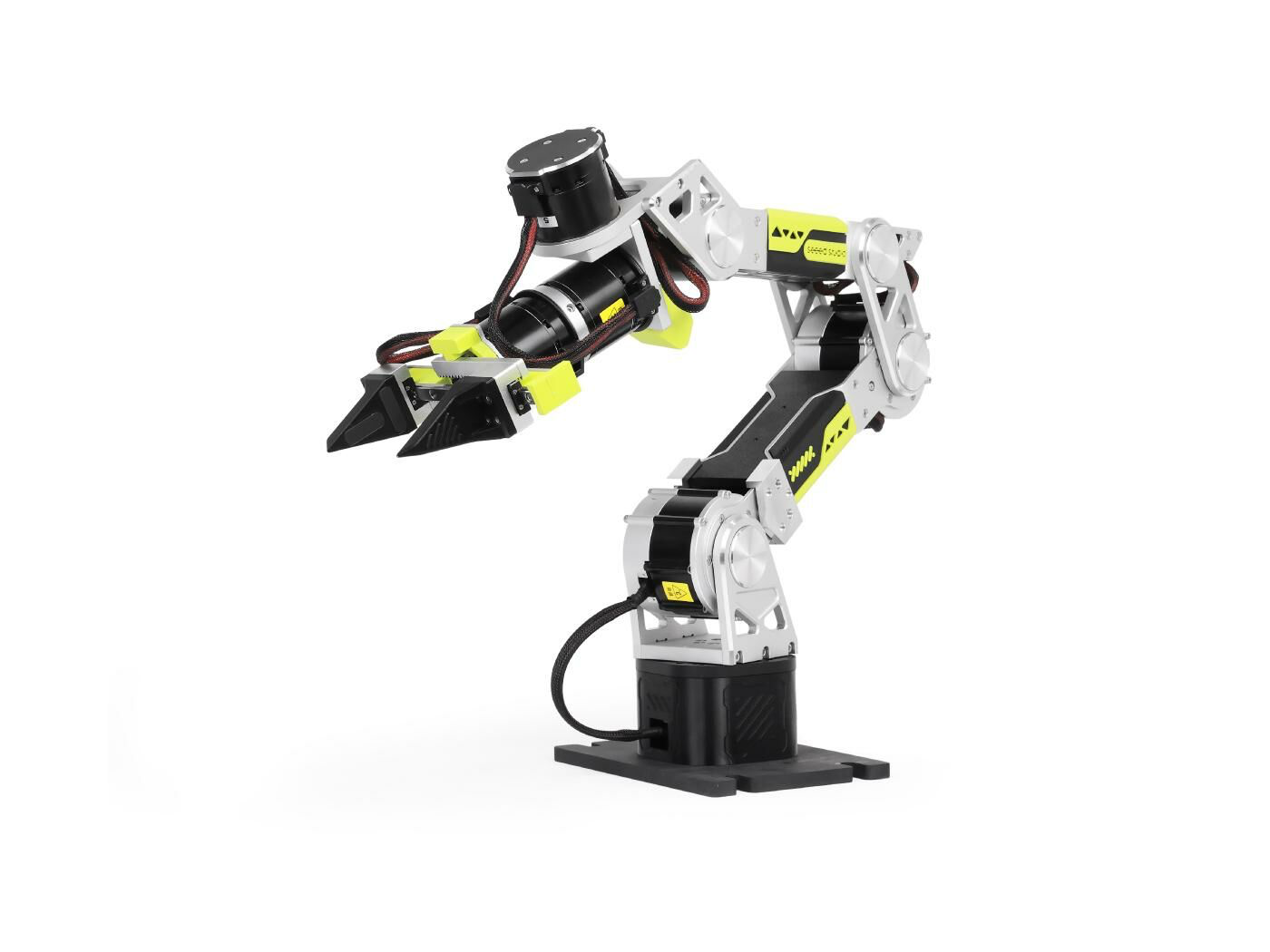
reBot DevArm B601-RS Robotic Arm (100019336)
6+1 DOF open-source slave robotic arm assembly, includes electric gripper and bus servos
Controlled slave arm, executes motions and grasping in response to commands; 48V/600W industrial-grade switching power supply (SKU 100054289) for independent regulated power, requires a 6-inch G-clamp (SKU 100014192) to physically secure to the lab bench to prevent tipping during motion.
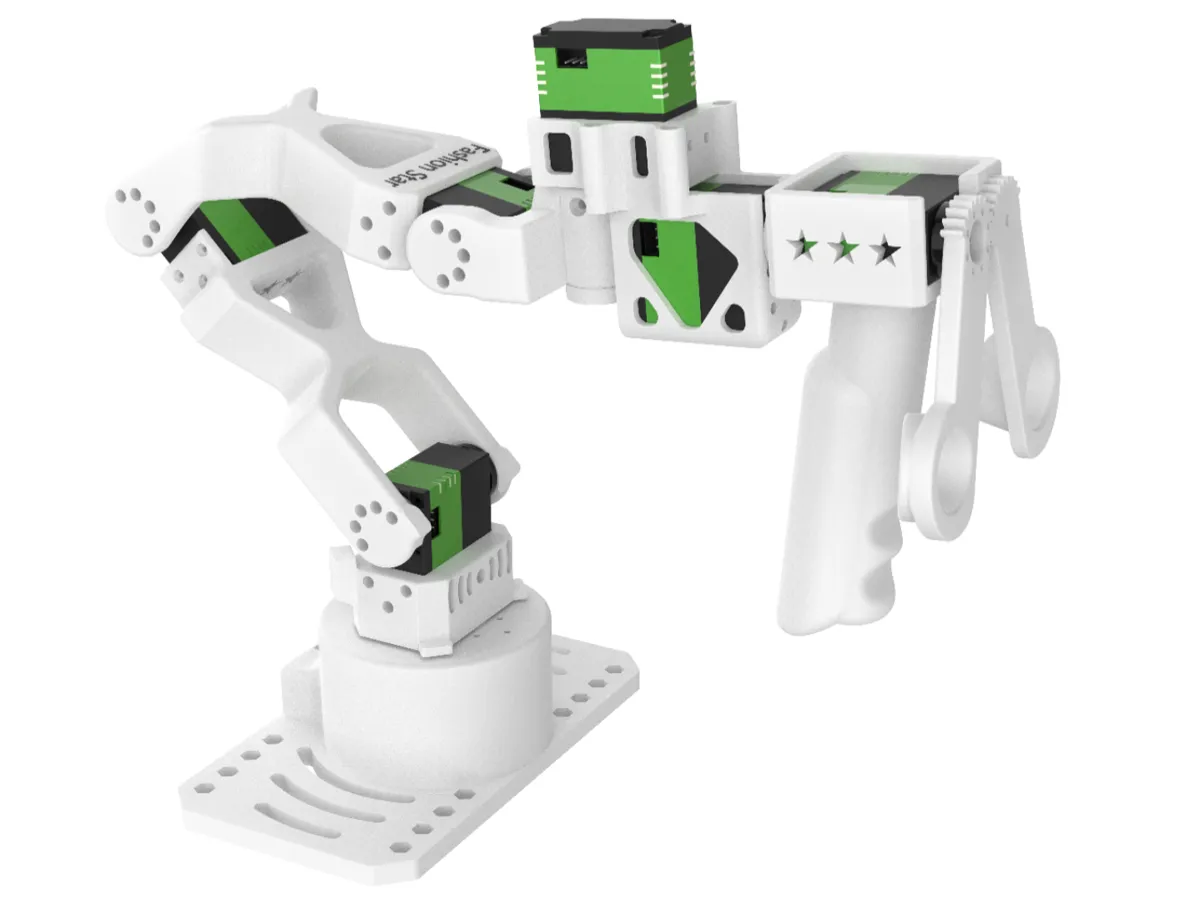
Star Arm 102 Master Teach Arm (100004723)
6-DOF modular master teach arm, LeRobot-compatible
Master teach terminal, manually guided operation drives the slave arm to mirror motions in real time, achieving 1:1 master-slave pose mirror mapping; 12V/2A multi-plug power adapter (SKU 100033211) for independent power, kit includes XT30 male connector cable.
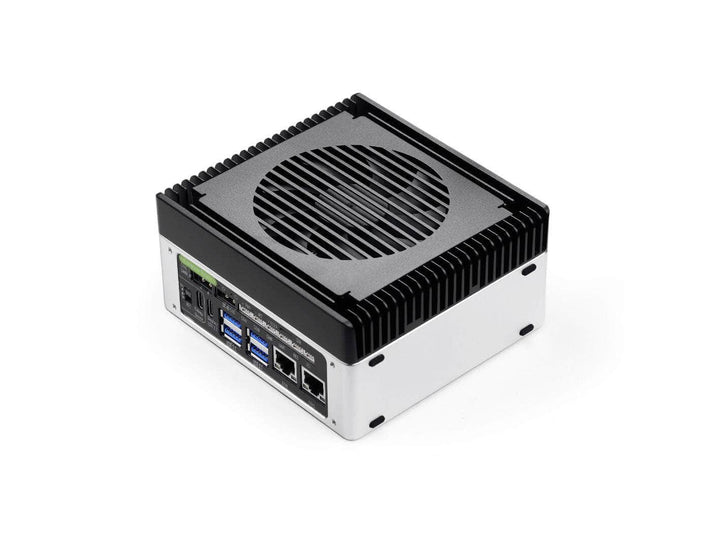
reComputer Super J4012(114110314)
Jetson Orin NX 16GB edge compute host
Control hub, running robotic-arm kinematics solving, control services, and LLM inference; factory-preinstalled JetPack 6.2, verify SenseCraft Robotics service and Python (Pinocchio / Motorbridge SDK) runtime environment are ready; powered by 19V/4.7A high-power adapter.
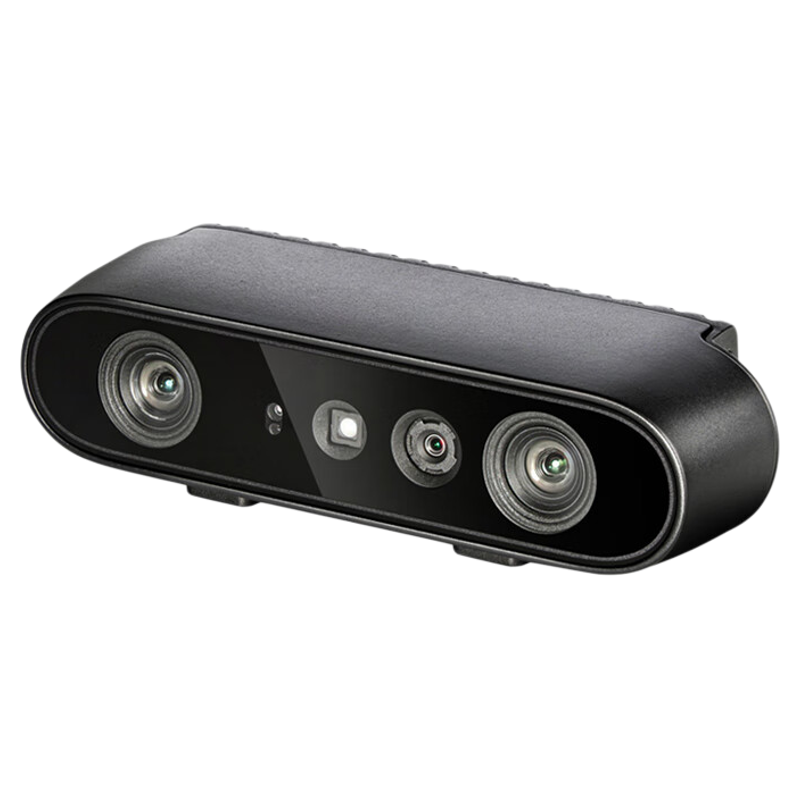
Orbbec Gemini 2 3D Camera (101090144)
Dual infrared 3D depth camera, Type-C interface
Spatial 3D vision guidance, directly reads the 3D physical coordinates (X, Y, Z) of objects in space to achieve spatial closed-loop grasping; at L3, hand-eye calibration alignment with the robotic-arm base coordinate frame is required to ensure measured coordinates can be correctly converted to joint angles by Pinocchio.
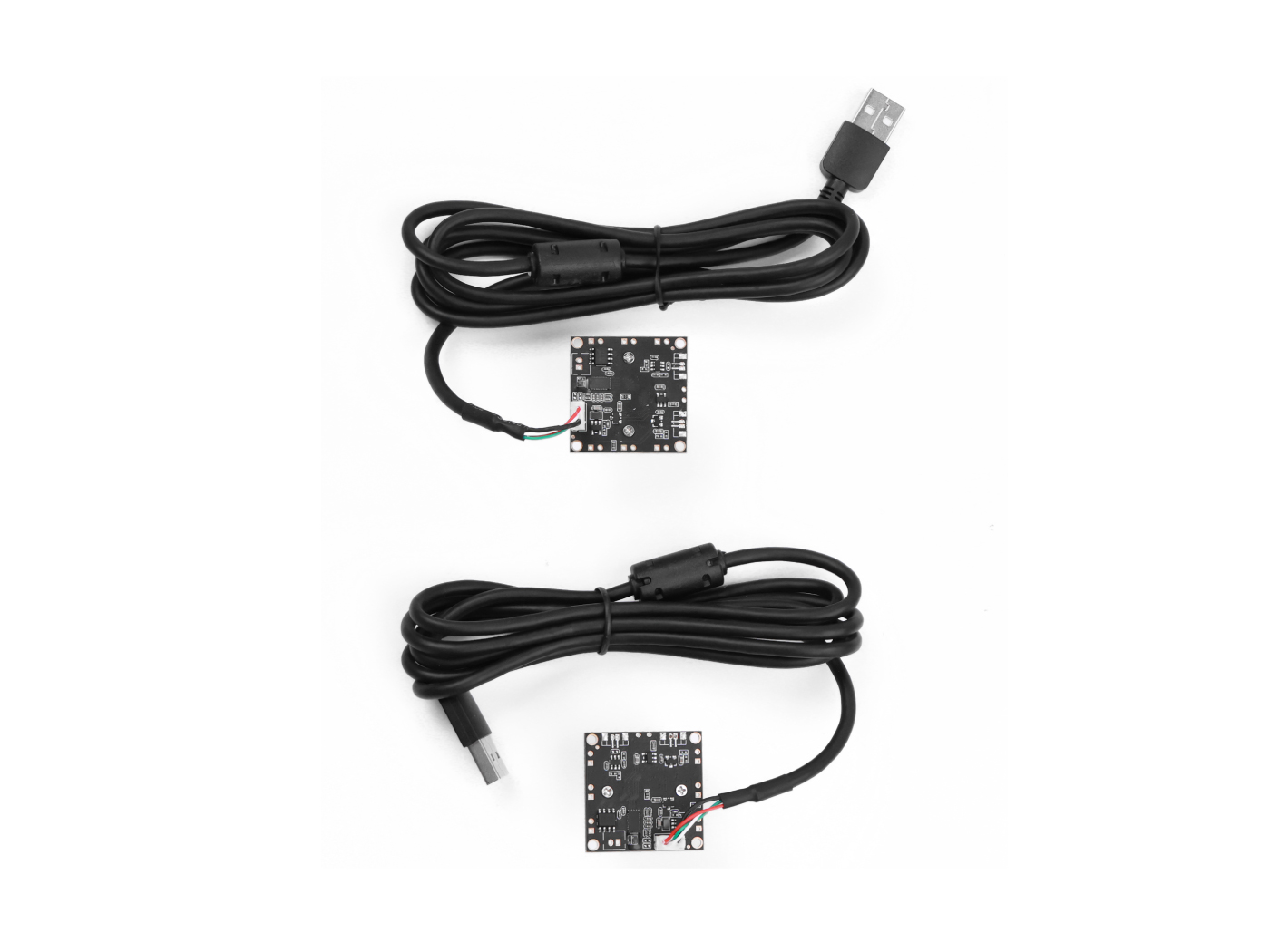
ET-S231 Wide-Angle 1080P USB Camera (100035502)
Workstation image capture terminal
Used for robotic-arm workstation material arrival detection, process event triggering, and embodied data-collection vision input; paired with a dual-camera mount for front/top multi-angle capture, providing state-trigger signals in a structured constant-lighting environment.
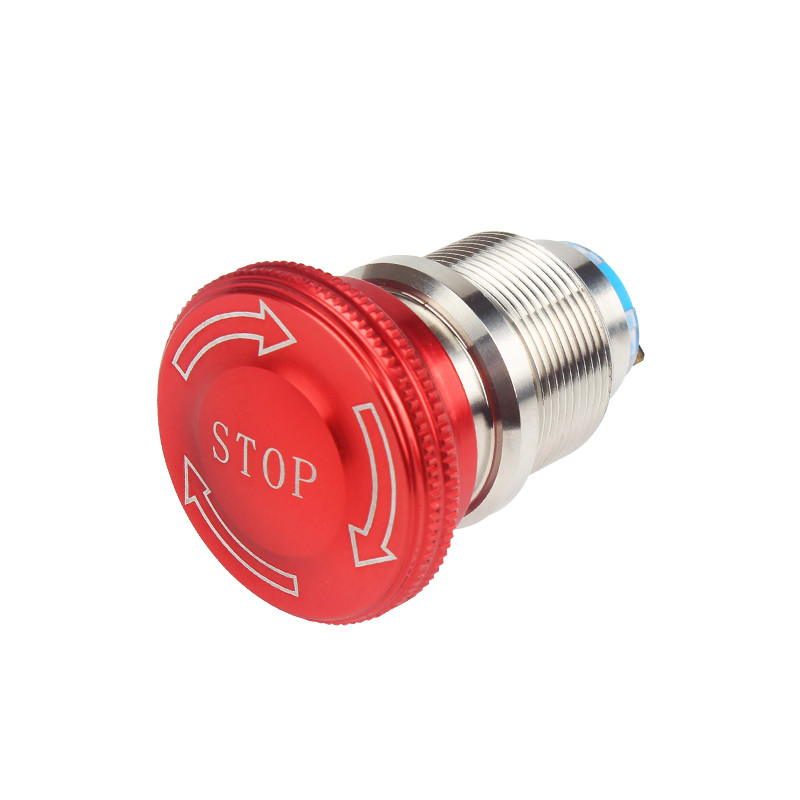
Industrial-Grade Independent Emergency Stop Button (100091373)
Large mushroom-head emergency stop switch with normally-closed mechanical contacts
Safety gate, wired in series with the power circuit; pressing it immediately hard-cuts power; an independent hardware normally-closed circuit not connected to software control, placed within easy reach of the operator.
Additionally configured with dual-camera mount (100006505), robotic-arm data collection light-control box (100094392), reSpeaker Flex voice kit (100005504 / 100099135), screen, integrated power design, router, and other common accessories.
Codecraft helps you dare to make, aily-blockly helps you finish it
M0 adopts dual-platform relay toolchain for zero-install, 5-minute results.
SenseCraft Robotics + Master Arm
Zero-code action orchestration · master-slave 1:1 mirror teleoperation · voice command triggering
- Out-of-box connection
- Master-slave teleoperation / voice commands
- Multi-action flow orchestration and safety confirmation
Python + Pinocchio + Motorbridge SDK
Inverse kinematics solving · real-machine spatial grasping closed loop · exception handling and safe retraction
- Depth camera 3D positioning
- Pinocchio inverse kinematics solving
- Motorbridge-driven real-machine grasping
LeRobot + VLA + Isaac Sim
Action dataset standard · embodied LLM · digital twin simulation
- Teleoperation action data collection
- VLA model principle understanding
- Isaac Sim simulation verification
Additionally requires HTTP / MQTT message notifications (workstation vision event triggering and cross-system integration) and reSpeaker Flex voice kit (natural-language command capture and announcement).
Three-tier Progression: Demo → Consultant → Design
Selection Awareness, Safety Standards, and Out-of-Box Setup
Teleoperate Six-Axis Robotic Arm, Real-Time Sync Multi-DOF Motions
- Understand industrial robotic-arm categories (Cartesian gantry, SCARA, Delta, six-axis articulated) and the commercial selection trade-offs of speed/precision/load/safety/cost
- Master robotic-arm physical workspace boundaries, hardware emergency stop usage, and safety operation procedures
- Master SenseCraft platform out-of-box connection, run through master-slave teleoperation and voice-command grasping
Scenario Analysis, Spatial Intuition, and Multimodal Orchestration
Autonomously Identify Targets & Execute Grasping, Flexibly Respond to Position Changes
- Clearly explain to clients why 3D scenarios require six-axis robotic arms and their selection boundaries
- Master SenseCraft multi-action flow orchestration and the "Generate → 3D Preview → Human Confirm → Real-Machine Execute" safety-confirmation mechanism
- Master workstation-vision-based event triggering and micro-scenario setup, achieving 3 consecutive stable runs
3D Spatial Grasping Closed Loop and Embodied Intelligence Outlook
Customize Dedicated Scenario Applications, Quickly Adapt to Specific Workflows
- Use an RGB-D depth camera to obtain target 3D physical coordinates, call Pinocchio via Python for automatic motor-angle conversion, and use Motorbridge to drive the real machine for spatial grasping and exception handling
- Master the master-slave teleoperation action dataset collection workflow (LeRobot standard format), understand the basic principles of VLA embodied LLMs and Isaac Sim digital twin simulation
- Deliver complete Python grasping project source code, teleoperation dataset, and solution design document
Curriculum / 15 teaching modules
Same module order, you choose the cut
Select a format to see which modules it covers.
| Module / Output | Taster1 day | Workshop2–3 days | Bootcamp3–5 days | ||
|---|---|---|---|---|---|
| 01 | Pre-class Preparation and Environment Pre-checkHardware bench inventory, robotic-arm physical fixation and power-on self-test, safety isolation zone setup, control hub and network pre-configuration, vision capture kit and light-control box readiness | — | Full | Full | Full |
| 02 | Robotic-Arm Selection and Commercial Trade-offsCommon configurations (Cartesian/SCARA/Delta/six-axis), speed/precision/load/safety/cost trade-offs, six-axis general-purpose preferred logic | — | Full | Full | Full |
| 03 | Hands-On Safety First Lesson and Emergency Stop DrillWorkspace boundary delineation, hardware emergency stop physical power-cut principle and drill, collision prevention and slow-speed operation, power on/off and safe reset procedures | Hardware emergency stop button | Full | Full | Full |
| 04 | SenseCraft Out-of-Box Setup and Master-Slave TeleoperationB601 joint structure and interface familiarization, browser access to SenseCraft console, device connection and basic jogging, master-slave arm 1:1 mirror teleoperation and trajectory recording | SenseCraft Robotics / Star Arm 102 | Full | Full | Full |
| 05 | Voice Command Control and First Grasp VerificationreSpeaker microphone array integration, natural-language triggering of preset grasping actions, milestone deliverable: one successful grasp triggered by voice command | reSpeaker Flex / SenseCraft | Full | Full | Full |
| 06 | Deployment Scenarios and Cycle Time CalculationRobotic-arm applicable scenarios (lightweight sorting/loading-unloading/booth interaction/fixed-point inspection), non-applicable boundaries (>1 piece/sec high-speed mass production/overload), process cycle time and throughput estimation | — | None | Full | Full |
| 07 | 3D Spatial Intuition and the Necessity of Six AxesCylinder/conveyor 2D planar limitations vs robotic-arm 3D space (X,Y,Z) + rotational pose, 3D interface understanding of reach limits and singularity dead zones | SenseCraft 3D Preview | None | Full | Full |
| 08 | Action Orchestration and Safety Confirmation MechanismMulti-waypoint serial operation flow (Move → Open Gripper → Descend → Close Gripper → Lift → Place), "Generate → 3D Preview → Human Confirm → Real-Machine Execute" confirmation gate | SenseCraft Robotics | None | Full | Full |
| 09 | Workstation Vision Data Collection and Event IntegrationLight-control box constant-lighting structured environment, ET-S231 camera workstation image capture, material arrival detection as event trigger, integrated grasping flow, group micro-scenario setup (3 consecutive stable runs) | ET-S231 / Light-Control Box / SenseCraft | None | Full | Full |
| 10 | Depth Camera 3D Positioning and Hand-Eye CalibrationMonocular vs depth camera, RGB-D reading of object 3D physical coordinates (X,Y,Z), hand-eye calibration from camera coordinate frame to robotic-arm base coordinate frame | Orbbec Gemini 2 / Python | None | None | Full |
| 11 | Pinocchio inverse kinematics solving and exception handlingPython calling Pinocchio library, automatic calculation of 6 joint angles from target coordinates, out-of-workspace/solve-failure exception alerting and safe retraction | Python / Pinocchio | None | None | Full |
| 12 | Motorbridge Real-Machine Driving and End-to-End Grasping Closed LoopPython calling Motorbridge SDK to drive smooth motion and gripper control, integrating the full pipeline: depth camera detection → Pinocchio inverse kinematics → Motorbridge-driven grasping | Python / Motorbridge SDK | None | None | Full |
| 13 | Teleoperation Action Dataset Collection (LeRobot)Embodied LLM data collection logic, light-control box + dual-camera front/top view capture, master-slave teleoperation recording of joint angles and vision frames, LeRobot standard format dataset | Star Arm 102 / LeRobot / Dual-Camera Mount | None | None | Partial |
| 14 | VLA Embodied LLM and Isaac Sim Simulation IntroductionVLA model input text + image output action architecture understanding, Isaac Sim loading robotic-arm 3D assets, virtual physics collision and simulation control, "simulate first, then real machine" development approach | VLA / Isaac Sim | None | None | Partial |
| 15 | Solution Review and Delivery SummaryGroup solution rehearsal and configuration review, exception and failure case retrospective, demo-line vs industrial production-line engineering gap summary (repeatability accuracy/continuous operation reliability/industrial cycle time/safety certification), source code documentation and configuration archiving | — | Partial | Full | Full |
● Full◐ Partial— None●+ Extended
The coverage key maps to course format IDs (taster / workshop / bootcamp), with values of full (complete coverage) / part (abbreviated coverage) / none (not included) / plus (deeper than full version). The taster session focuses on L1 selection awareness, safety standards, and SenseCraft out-of-box teleoperation, excluding vision integration and 3D grasping development; the workshop covers full L1+L2 scenario analysis, action orchestration, and workstation vision event triggering; the bootcamp fully covers L1+L2+L3, including deterministic 3D spatial grasping closed loop and cutting-edge embodied intelligence exploration.
Pick the layer, then the format
Time and goals determine which layer to choose.
Taster Session
No FP1 day · 6–8h · L1 presentation layer · focusing on selection awareness, safety standards, and SenseCraft out-of-box teleoperation
- Day 1 MorningModules 01 + 02 + 03
Environment pre-check → Robotic-arm selection and commercial trade-offs → Hands-on safety first lesson and emergency stop drill
- Day 1 AfternoonModules 04 + 05 + 15 (abbreviated)
SenseCraft out-of-box setup and master-slave teleoperation → Voice command grasping first verification → Summary review
The taster session goal is "understand, explain, and demonstrate" — achieving the demo effect of master-slave teleoperation and voice-command grasping. Does not include workstation vision integration or 3D spatial grasping development.
Hands-On Course
Full FP2–3 days · 14–20h · L1+L2 · scenario analysis + action orchestration + workstation vision event-triggered integration
- Day 1Modules 01–05
Environment pre-check → Selection awareness → Safety emergency stop → SenseCraft teleoperation → Voice grasping first verification
- Day 2Modules 06–09
Deployment scenarios and cycle time calculation → 3D spatial intuition → Action orchestration and safety confirmation → Workstation vision event integration
- Day 3 (optional)Module 15
Solution Review and Delivery Summary
The workshop delivers one micro-scenario operation system triggered by workstation vision (3 consecutive stable runs). Student prerequisite: basic network configuration and system integration concepts.
Delivery Course
Full FP3–5 days · 24–35h · L1+L2+L3 · full coverage including deterministic 3D spatial grasping closed loop and cutting-edge embodied intelligence exploration
- Day 1–2Modules 01–09
Full L1+L2 content (selection safety + teleoperation voice + scenario orchestration + vision integration)
- Day 3Modules 10–12
Depth camera 3D positioning and hand-eye calibration → Pinocchio inverse kinematics solving → Motorbridge end-to-end grasping closed loop
- Day 4Modules 13–14
LeRobot teleoperation action dataset collection → VLA embodied LLM and Isaac Sim simulation introduction
- Day 5Module 15
Solution Review and Delivery Archiving
The bootcamp goal is the ability to independently deliver deterministic 3D spatial grasping engineering. Student prerequisite: basic Python programming and Linux skills, familiarity with L1–L2 competencies.
The taster session is the standard format for solution demos and client communication: zero-code barrier, 1-day closed loop, focusing on "the robotic arm moves, voice controls it." Suitable for exhibitions, technology open days, and initial client contact scenarios.
Workshop Day 3 is an optional flexible day: if students have a strong foundation, it can be compressed to 2 days (Day 2 afternoon merged with review); if more micro-scenario integration time is needed, use the full 3 days.
The robotic arm is a powered mechanism; during hands-on operation, safety procedures must be strictly followed, and body parts must not enter the robotic arm motion envelope. The emergency stop button is an independent hardware normally-closed circuit, not connected to software control, placed within easy reach of the operator.
The reBot DevArm B601-RS is powered by a 48V/600W industrial-grade switching power supply and must be physically secured to the lab bench with a 6-inch G-clamp to prevent tipping during motion. Before power-on, the instructor must confirm wiring and fixation status.
Control scenarios are strictly prohibited from extending to high-voltage strong-current and safety braking systems. This course does not provide ISO 10218/TS 15066 industrial robot safety certification endorsement and does not replace statutory industrial safety certification.
The taster session does not include workstation vision integration or 3D spatial grasping development content. Do not promise clients that taster session students can independently complete spatial grasping — that is the bootcamp delivery standard.
Who This Course Is For
The value of this course is not in the robotic arm itself, but in the method of "connecting physical execution to digital systems"
M6 is not a course that teaches students to "tune robotic-arm parameters," but a methods course teaching teams how to use open-source toolchains and lightweight hardware to connect vision perception, natural-language commands, and physical actuators. What Chaihuo delivers is never just "one class session," but a complete set of things that can be taken apart, rewritten, and reassembled: 15-module course skeleton, teacher lesson plans and PPT, SenseCraft action configuration templates, Python grasping project source code, Pinocchio/Motorbridge calling examples, LeRobot dataset collection specifications, equipment inventory, and bench safety specifications.
Opening 01
Change the Scenario
The micro-scenario of Module 09 "Workstation Vision Event Triggering and Integration" is open: your industry, your client site, a real problem happening in this city. Sorting can be agricultural products, electronic components, or express waybills — the closer the problem is to a real site, the better the effect, and you know this better than we do.
Opening 02
Connect Devices
Your existing client legacy equipment, sensors on school training benches, and partner vision inspection systems can be connected after Module 09 to become the object pool for event-triggering exercises. M6 is responsible for explaining the method thoroughly; what trigger source to connect behind the door is up to you.
Opening 03
Add Your Own
What you have accumulated in the industry: the pitfalls encountered in robotic-arm selection, the analogy that makes students instantly understand inverse kinematics, the three safety questions most commonly asked at client sites — those are precisely the parts we do not have and cannot provide.
The best destiny of a robotics course is not to be executed in full once, but to be modified beyond recognition by an engineer and then become the solution that only he can deliver.
Scope Boundaries & Compliance
Core Principles
Low-speed supervised control + independent hardware emergency stop, not a replacement for safety-critical systems.
In Scope
- Lightweight sorting demos, booth interaction, teaching and training, and low-speed supervised control scenarios
- Agricultural and industrial part appearance classification grasping, material transfer, and sequential stacking
- Voice/vision interactive welcome, trajectory display, and fixed-point inspection imaging
- Deterministic 3D spatial grasping engineering development based on RGB-D depth cameras
- Embodied intelligence algorithm verification, LeRobot standard action dataset collection, and research training
Out of Scope
- Control scenarios are strictly prohibited from extending to high-voltage strong-current and safety braking systems.
- Does not provide ISO 10218/TS 15066 industrial robot safety certification endorsement; this course does not replace statutory industrial safety certification.
- The emergency stop is an independent hardware normally-closed circuit, not connected to software control; replacing the hardware emergency stop with software commands is strictly prohibited.
- Does not cover high-speed industrial cycle times (>1 piece/sec), high-precision force-controlled assembly, or 7×24 unattended harsh operating conditions
- Does not include micron-level precision assembly (e.g., precision pin-hole insertion) or complex flexible irregular material grasping
- Does not promise specific grasping success rates for particular scenarios (affected by lighting conditions, object material reflectivity, and placement pose; acceptance criteria are based on on-site measured records)
- The robotic arm contains precision reducers; during transition and storage, a custom shock-absorbing case must be used to fix the pose, avoiding transport impact damage to joint gears